We are proud to present the release of Gitea version 1.17.0, a relatively big release with a lot of new and exciting features and plenty breaking changes.
We highly encourage users to update to this version after carefully reading about the breaking changes for some important bug-fixes.
645 Pull Requests were merged to release this version.
You can download one of our pre-built binaries from our downloads page - make sure to select the correct platform! For further details on how to install, follow our installation guide.
We would also like to thank all of our supporters on Open Collective who are helping to sustain us financially.
Read on to learn about major new features and breaking changes.
Thanks to @KN4CK3R, Gitea now includes a package registry for various package managers (Composer, Conan, Generic, Helm, Maven, npm, NuGet, OCI Containers (Docker), PyPI and RubyGems).
This will be very useful for teams that want to deploy their software from their own infrastructure.
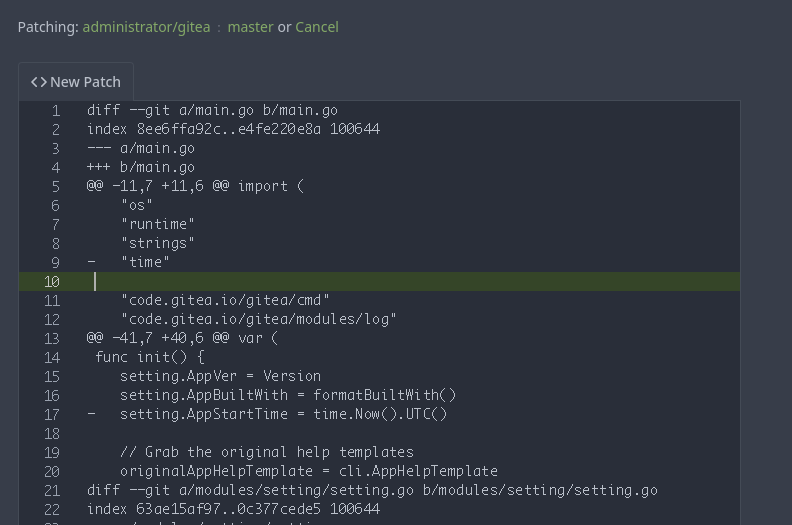
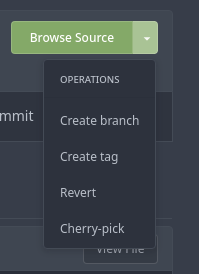
Thanks to @zeripath, you no longer need to switch to your local checkout to do common git operations like cherry-pick, revert, apply-patch.
Instead, Gitea now provides a handy UI for these tasks!
@Gusted worked to significantly improve the mobile experience of Gitea:
A lot of the frontend has been refactored without making major changes to the current UI.
It now has a more responsive design, hence making browsing Gitea on mobile phones a more pleasant experience!
Check out the linked Pull Request for a demo & comparison of the updated layouts.
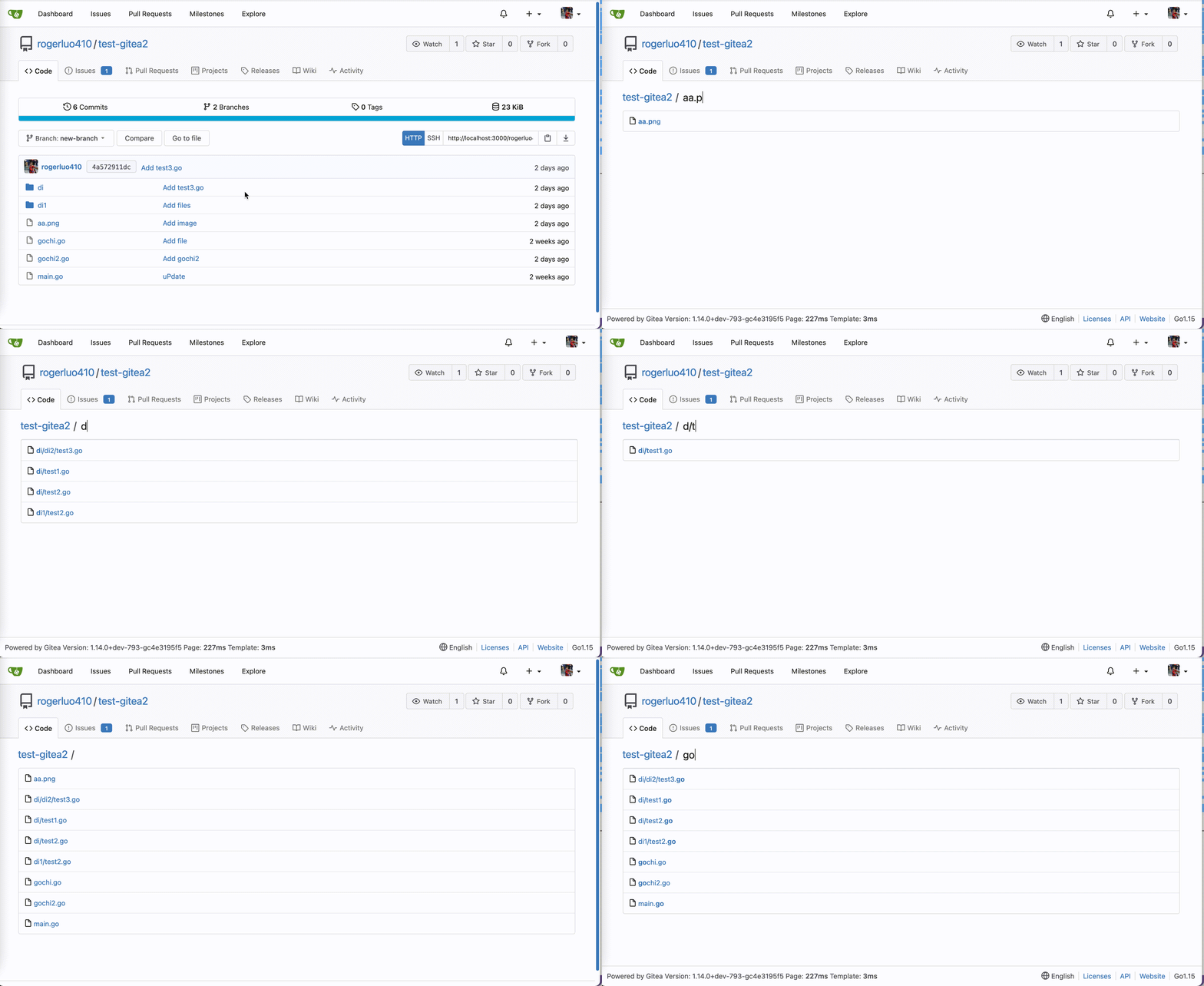
Navigating many files is often a struggle.
This release features some workflow improvements you may already know from other forges:
During PR review, you can now mark changed files as reviewed and be informed about later changes to them (#19007).
You can watch a demo in the linked Pull Request
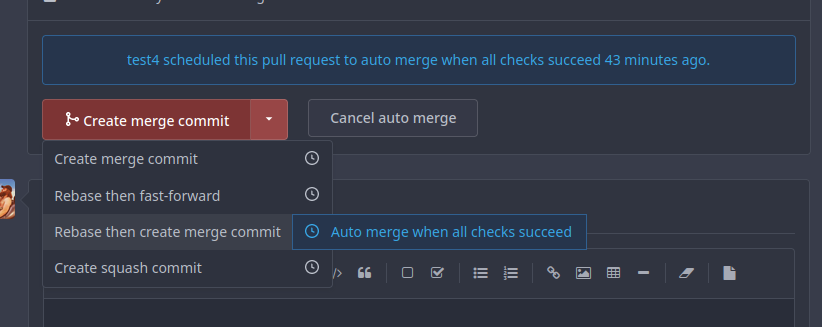
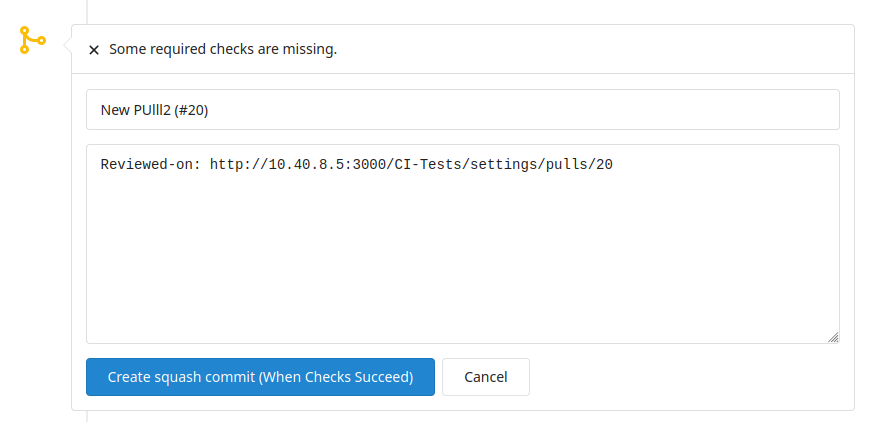
Thanks to @6543 & @kolaente, Gitea now allows you to merge a Pull request when all required checks have passed, either via the WebUI or via the API.
Note that this feature will only be enabled when the target branch has branch protection.
Thanks to @qwerty287, Gitea now allows you to decide if maintainers of the upstream
repository can push to the head branch of your PR when creating a Pull Request from a fork.
This enables a workflow similar to how Gitea itself is maintained currently and can simplify the PR workflow for open source development.
Thanks to @fnetX, to combat spam and confidential information, issues (and subsequently PRs) can now be permanently deleted.
A repository admin or instance admin can find the delete button at the bottom of the sidebar of the issue or pull reuqest.
Thanks to @zeripath, wiki pages now show their logical structure automatically in the sidebar. This removes the need to manually maintain a ToC and helps you to skim for the most important sections.
🚀 Customizing the default commit messages (#18177)
Thanks to @lunny, you can now set the default merge message used for merging PRs.
The customization files must be in .gitea/default_merge_message/<uppercase_merge_style>_TEMPLATE.md.
More information on the file names and possible variables can be found here.
When you migrate a repository including its issues, their original ID will be persisted.
This is only the first step to allow complete mirroring of issues and Pull Requests from other (Gitea, GitHub, GitLab, …) instances, with more to come in later releases.
Gitea 1.17 lays the foundation to allow instances to communicate with each other in the future:
A new API path to allow basic communication of statistics between each other was added (#19561).
Additionally, with #19462, basic global data about users such as the preferred avatar can now be communicated.
Federation is under active development, and it will be interesting to see what will be achieved in the next few releases.
Stay tuned for what is yet to come!
Previously, Gitea used the users gitconfig ($HOME/.gitconfig) in addition to the system gitconfig (/etc/gitconfig).
Now, Gitea uses the system gitconfig (/etc/gitconfig) combined with an internal gitconfig located in {[git].HOME_PATH}/.gitconfig.
If you customized your user gitconfig for Gitea, you should add these customizations to one of the available gitconfigs. Additional git-relevant files that are normally in your user home directory, like $HOME/.gnupg, should be moved/ copied to {[git].HOME_PATH}/ as well.
With this release, Gitea restricts what is seen as a valid email:
Emails must only contain characters in a-zA-Z0-9.!#$%&'*+-/=?^_{|}`~. Additionally, the first letter must be in a-zA-Z0-9, and after the @, only characters in a-zA-Z0-9. can follow.
❗ Renamed configuration options for ACME / Let’s Encrypt (#18340)
Configuration settings have been renamed from LETSENCRYPT to ACME. The old settings are deprecated and will be removed in 1.18, you should migrate now.
This PR substantially changes the logging format of the router logger.
If you use this logging for monitoring (e.g. fail2ban) you will need to update this to match the new format.
Refer to the documentation on the router logger for new configuration options.
The default value of the setting repository.DEFAULT_BRANCH was switched from master to main.
If you want to continue using master as default branch name, set this setting.
This change is especially relevant for third party tools that assume the default branch of a repository.
❗ Change initial trust model to committer (#18335)
Previously, Gitea would by default use the collaborator trust model.
This means only verified commits of collaborators can be trusted.
This was quite an aggressive trust model, and now it has changed to match GitHub’s behavior of trusting the commiter.
This means verified commits in a repository from non-collaborators won’t be marked as unverified.
If you rely on the old behavior, you must set DEFAULT_TRUST_MODEL to collaborator.
The minimal required Git version has been raised to 2.0.
Versions below that are now unsupported and will prevent the application from starting.
In general, it is recommended to stay up-to-date with your Git version as some Gitea features or optimizations can only be used once they are available in Git.
It is now not only possible to set a custom logo, but also a custom favicon.
If you are currently using a custom logo, you need to re-run the steps described here.
❗ RequireHighlightJS removed from templates (#19615)
The following usernames are now newly reserved: avatar, ssh_info, and swagger_v1.json.
The following usernames are no longer reserved: help, install, less, plugins, stars, and template.
If you want to check if you’re affected, please run the following Gitea doctor command:
gitea doctor --run check-user-names
Note that this command is only available after upgrading to 1.17.1.
❗ Deprecated SSH ciphers removed from default setting (#18697)
This only affects Gitea instances that have enabled the internal SSH server.
Previously, Gitea allowed unsecured algorithms to be used for an SSH connection.
Older versions of OpenSSH might not be able to connect to Gitea anymore.
❗ Display messages for users if the ROOT_URL is wrong, show JavaScript errors (#18971)
Previously, Gitea would allow an incorrect ROOT_URL to be set in the settings. This caused unexpected issues when people don’t use that URL to visit Gitea.
Therefore, Gitea will now show an error in the UI when this is the case.
Please check if your ROOT_URL is set correctly and avoid accessing the instance using other URLs to avoid the error message.
❗ /api/v1/notifications does not include repo permissions (#19761)
Previously, /api/v1/notifications returned repository.permissions but the permissions were calculated incorrectly.
Due to this and the fact that there exists another route to get the repo permissions, this field will always be null from now on.
❗ HTTP status codes updated: 302 → 307 and 301 → 308 (#18063)
Previously, Gitea often returned the incorrect status codes Found (302) and Moved Permanently (301).
All occurrences of such status code were now changed to Temporary Redirect (307) and Permanent Redirect (308) respectively.
❗ No more admin notice about successful cron tasks (#19221)
Successful cron task no longer emit a notification by default.
This breaks NO_SUCCESS_NOTICE settings.
If you want notices on success, you must set NOTICE_ON_SUCCESS=true.